


If game programmers ever cracked open Design Patterns at all, never got past Singleton. Gang of Four’s is inapplicable to games in its original version.
Design patterns

Design patterns in applications

Design patterns in games

Action Patterns
Data-Passing Components
- ~visual programming
- thinks solely in terms of sending streams of data from one object to another
- every component has a set of ports to which a data stream can be connected
- requires a visual editor
- good for dynamic data processing (shaders, animations, AI decisions)

Unreal Blueprints

Unity Visual Scripting
Example: Godot Editor (Cancelled in Godot 4)

Event System
- games are event-based
What we need
- event emitter (a library responsible for sending events)
- a list of events that take place in the game
- for each component, a list of events it can either send or react to


Processes and Actions
- Process - something that requires more than one frame to finish
- basically everything that involves animations
Example: Pacman


Chain
- Chain - a pattern that allows to execute a sequence of events/commands in a given order
-
Implementation
- callback chaining - basically in every language, very bad robustness
- iterator blocks - C#
- async/await - JavaScript and C#
- generators - JavaScript
- coroutines - Kotlin, Ruby, Lua,...


Chain Example (C#)
| 1 | |
| 2 | public async Task EnterDoorAction(Door door) { |
| 3 | this.Context.Player.BlockInput(); |
| 4 | await new DoorAnimation(door).Open(); |
| 5 | await new WalkAnimation(this.Context.Player).Walk(this.Context.Player.direction); |
| 6 | this.Context.Player.Hide(); // hide the sprite once it approaches the house |
| 7 | await new DoorAnimation(door).Close(); |
| 8 | await Delay(500); // wait for 500 ms |
| 9 | } |
| 10 | |
| 11 | ....... |
| 12 | |
| 13 | public async Task OnPlayerDoorApproached(Door door) { |
| 14 | await new EnterDoorAction(door); |
| 15 | await new SceneLoader(door.TargetScene); |
| 16 | } |
Chain Example (ECSLite library)
| 1 | this.owner.addComponent(new ChainComponent() |
| 2 | .call(() => player.blockInput()) |
| 3 | .waitFor(new DoorAnimComponent(DoorActions.OPEN)) |
| 4 | .waitFor(new WalkAnim(player, direction)) |
| 5 | .call(() => player.hide()) |
| 6 | .waitFor(new DoorAnimComponent(DoorActions.CLOSE)) |
| 7 | .waitTime(500)); |
Delayed invocation
- an action/event that should happen after a given amount of time
- always prefer an approach the engine recommends over features built into the scripting language
- e.g. setTimeout() in JavaScript is invoked from within the event loop, not during an update loop
- example: Unity Delayed Invocation
1 IEnumerator Spawn () { 2 // Create a random wait time before the prop is instantiated. 3 float waitTime = Random.Range(minTimeBetweenSpawns, maxTimeBetweenSpawns); 4 // Wait for the designated period. 5 yield return new WaitForSeconds(waitTime); 6 7 // Instantiate the prop at the desired position. 8 Rigidbody2D propInstance = Instantiate(backgroundProp, spawnPos, Quaternion.identity); 9 // Restart the coroutine to spawn another prop. 10 StartCoroutine(Spawn()); 11 }
Delay Invocation Example (COLFIO library)
| 1 | // wait for 2 seconds and load another scene |
| 2 | this.sendMessage(Messages.PAUSE); |
| 3 | this.scene.callWithDelay(2000, () => { |
| 4 | Factory.loadScene(Scenes.MAIN_MENU); |
| 5 | }); |
| 6 | this.finish(); |
Delay Invocation Example (KKD)
| 1 | void Item::SpawnDeferred(const std::function<void(ItemEntity&)>;& OnSpawned, const QuatT& transform) { |
| 2 | ExecuteDeferred([this, OnSpawned, transform]() { |
| 3 | auto* spawnedItem = entitySystem->SpawnUnsafeItem(transform); |
| 4 | if (spawnedItem) { |
| 5 | OnSpawned(*spawnedItem); |
| 6 | } |
| 7 | }); |
| 8 | } |
| 9 | //========================================================================= |
| 10 | Deferrable::~Deferrable() { |
| 11 | GetDeferredSystem().CancelAllDeferred(*this); |
| 12 | } |
| 13 | |
| 14 | //========================================================================= |
| 15 | template <class Fn> |
| 16 | bool Deferrable::ExecuteDeferred(Fn&& fn) const { |
| 17 | const auto ret = GetDeferredSystem().ExecuteDeferred(std::forward<Fn>(fn), *this); |
| 18 | return ret; |
| 19 | } |
Separation of concerns
- common misuse is to handle complex events in one place
- solution: send events and delegate the processing to handlers
- in one place
1 if(asteroid.position.distance(rocket.position) <= MIN_PROXIMITY) { // detect proximity 2 rocket.runAnimation(ANIM_EXPLOSION); // react instantly and handle everything 3 asteroid.runAnimation(ANIM_EXPLOSION); 4 playSound(SOUND_EXPLOSION); 5 asteroid.destroy(); 6 rocket.destroy(); 7 } - separated
1 // collision-system.ts 2 let collisions = this.collisionSystem.checkProximity(allGameObjects); 3 collisions.forEach(colliding => this.sendEvent(COLLISION_TRIGGERED, colliding)); 4 // rocket-handler.ts 5 onCollisionTriggered(colliding) { 6 this.destroy(); 7 this.sendEvent(ROCKET_DESTROYED); 8 } 9 // sound-component.ts 10 onGameObjectDestroyed() { 11 this.playSound(SOUND_EXPLOSION); 12 }
Antipattern: Quake death script
| 1 | void() PlayerDie = { |
| 2 | DropBackpack(); |
| 3 | self.weaponmodel=""; |
| 4 | self.view_ofs = '0 0 -8'; |
| 5 | self.deadflag = DEAD_DYING; |
| 6 | self.solid = SOLID_NOT; |
| 7 | self.flags = self.flags - (self.flags & FL_ONGROUND); |
| 8 | self.movetype = MOVETYPE_TOSS; |
| 9 | |
| 10 | if (self.velocity_z < 10) |
| 11 | self.velocity_z = self.velocity_z + random()*300; |
| 12 | |
| 13 | DeathSound(); |
| 14 | |
| 15 | if (self.weapon == IT_AXE) { |
| 16 | player_die_ax1 (); |
| 17 | return; |
| 18 | } |
| 19 | |
| 20 | i = 1 + floor(random()*6); |
| 21 | if (i == 1) |
| 22 | player_diea1(); |
| 23 | else if (i == 2) |
| 24 | player_dieb1(); |
| 25 | else player_diec1(); |
| 26 | }; |

Responsibility ownership
- determines which component should be responsible for given scope/action/decision
- there is no bulletproof recipe, yet it should be unified within the game
- if the scope affects only one entity, it should be a component attached to that entity
- example: a worker that goes to the forest for some wood
- if the scope affects more entities, it's should be implemented in systems (or in a component of parent nodes)
- example: battle formation controller

Individual units

Battle formation

Optimizing Patterns
Data storing

Randomly

Sequentially
Flyweight
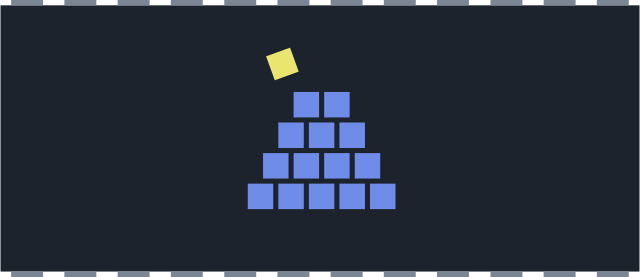
- an object keeps shared data to support large number of fine-grained objects
- e.g., instanced rendering, particle systems
- here we move a position and a tile index (Sprite) into an array

Execution Order
- game objects are consistent in the beginning and in the end of an update loop iteration
- they can easily get into an unconsitent state - one-frame-off lag
- possible solutions: bucket update, script execution order (Unity), process priority (Godot)

The object A reads the previous state of the object B, and the object B reads the previous state from the object C
Dirty Flag
- marks changed objects that need to be recalculated
- e.g., animations, physics, transformations (the most common case)
- you have to make sure to set the flag every time the state changes
Clean-up
- When the result is needed
- avoids doing recalculation if the result is never used
- game can freeze for expensive calculations
- At well-defined checkpoints
- less impact on user experience
- still, the game can freeze with too many dirty flags
- On the background
- more granular processing
- danger of race-condition

Example: Godot Cache
| 1 | void AnimationCache::_clear_cache() { |
| 2 | while (connected_nodes.size()) { |
| 3 | connected_nodes.front()->get() |
| 4 | ->disconnect("tree_exiting", callable_mp(this, &AnimationCache::_node_exit_tree)); |
| 5 | connected_nodes.erase(connected_nodes.front()); |
| 6 | } |
| 7 | path_cache.clear(); |
| 8 | cache_valid = false; |
| 9 | cache_dirty = true; |
| 10 | } |
| 11 | |
| 12 | void AnimationCache::_update_cache() { |
| 13 | cache_valid = false; |
| 14 | |
| 15 | for (int i = 0; i < animation->get_track_count(); i++) { |
| 16 | // ... 100 lines of code |
| 17 | } |
| 18 | |
| 19 | cache_dirty = false; |
| 20 | cache_valid = true; |
| 21 | } |
| 22 |

Structural Patterns
Two-stage initialization
- avoids passing everything through the constructor
- constructor creates an object, init method initializes it
- objects can be initialized several times
- objects can be allocated in-advance in a pool
| 1 | class Brainbot extends Unit { |
| 2 | |
| 3 | private damage: number; |
| 4 | private currentWeapon: WeaponType; |
| 5 | |
| 6 | constructor() { |
| 7 | super(UnitType.BRAIN_BOT); |
| 8 | } |
| 9 | |
| 10 | init(damage: number, currentWeapons: WeaponType) { |
| 11 | this.damage = damage; |
| 12 | this.currentWeapon = currentWeapons; |
| 13 | } |
| 14 | } |

Context
Context (Blackboard)
- shared data structure for a scope (or the whole game)
- may contain both states and properties
- e.g., player score, virtual money, number of lives
- often used in behavioral trees
| 1 | public void OnTriggerEvent(Event evt, GameContext ctx) { |
| 2 | |
| 3 | if(evt.Key == "LIFE_LOST") { |
| 4 | ctx.Inventory.clear(); |
| 5 | ctx.Boosts.clear(); |
| 6 | ctx.Player.Lives--; // access the context |
| 7 | if(ctx.Player.Lives <= 0) { |
| 8 | this.FireEvent("GAME_OVER"); |
| 9 | } |
| 10 | } |
| 11 | } |
Null Component
- Null Component or Dummy Component
- on the outside, it is identified as an actual component, on the inside, however, it doesn't do anything
- can be used in the cases when the presence of the actual component is required, yet its functionality isn't (e.g., if we mute all sounds)
- example: instant animations for debugging purposes
1 class NullAnimComponent extends Component { 2 3 constructor() { 4 super('AnimComponent') 5 } 6 7 onUpdate() { 8 // immediately end 9 this.finish(); 10 } 11 }
Selector
- a function that returns a value
- centralizes the knowledge of how to find an entity/attribute/component
- can form a hierarchy
| 1 | const getPlayer(scene: Scene) => scene.findObjectByName('player'); |
| 2 | |
| 3 | const getAllUnits(scene: Scene) => scene.findObjectsByTag('unit_basic'); |
| 4 | |
| 5 | const getAllUnitsWithinRadius(scene: Scene, pos: Vector, radius: number) => { |
| 6 | return getAllUnits(scene).filter(unit => unit.pos.distance(pos) <= radius); |
| 7 | } |
| 8 | |
| 9 | const getAllExits(scene: Scene) => { |
| 10 | const doors = scene.findObjectsByTag('door'); |
| 11 | return doors.filter(door => !door.locked); |
| 12 | } |
State Patterns
Mutability
- immutable state is a luxury only simple games can afford
- we should assume that most structures are mutable
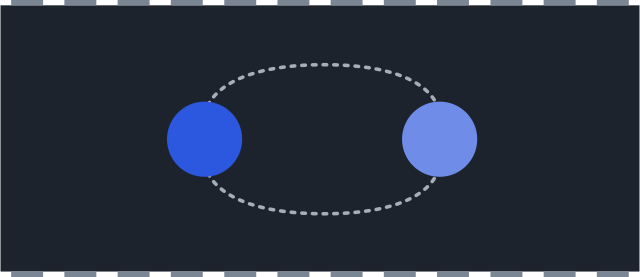
- selectors can help us access properties that are deep in the hierarchy
- dirty flag can help us find out if an entity has changed during the update
- transmuter can help us centralize complex modifications (will be covered later)
- messages can help us discover if any important structure has changed
Flag
- bit array that stores binary properties of game objects
- may be used for queries (e.g. find all MOVABLE objects)
- similar to a state machine but the use-case is different
- if we maintain all flags within one single structure, we can search very fast


Example: Flag Table


Numeric state
- the most basic state of an entity
- allows us to implement a simple state machine
| 1 | // stateless, the creature will jump each frame |
| 2 | updateCreature() { |
| 3 | if(eventSystem.isPressed(KeyCode.UP)) { |
| 4 | this.creature.jump(); |
| 5 | } |
| 6 | } |
| 7 | |
| 8 | // introduction of a state |
| 9 | updateCreature() { |
| 10 | if(eventSystem.isPressed(KeyCode.UP) && this.creature.state !== STATE_JUMPING) { |
| 11 | this.creature.changeState(STATE_JUMPING); |
| 12 | eventSystem.handleKey(KeyCode.UP); |
| 13 | this.creature.jump(); |
| 14 | } |
| 15 | } |

Creational Patterns
Builder
- a template that keeps attributes from which it can build new objects
- implements the "chainable" principle - each method returns back the builder itself
| 1 | class Builder { |
| 2 | private _position: Vector; |
| 3 | private _scale: Vector; |
| 4 | |
| 5 | position(pos: Vector) { |
| 6 | this.position = pos; |
| 7 | return this; |
| 8 | } |
| 9 | |
| 10 | scale(scale: Vector) { |
| 11 | this.scale = scale; |
| 12 | return this; |
| 13 | } |
| 14 | |
| 15 | build() { |
| 16 | return new GameObject(this._position, this._scale); |
| 17 | } |
| 18 | } |
| 19 | |
| 20 | new Builder().position(new Vector(12, 54)).scale(new Vector(2, 1)).build(); |

Builder Example (COLFIO)
| 1 | new Builder(scene) |
| 2 | .localPos(this.engine.app.screen.width / 2, this.engine.app.screen.height / 2) |
| 3 | .anchor(0.5) |
| 4 | .withParent(scene.stage) |
| 5 | .withComponent( |
| 6 | new FuncComponent('rotation') |
| 7 | .doOnUpdate((cmp, delta, absolute) => cmp.owner.rotation += 0.001 * delta)) |
| 8 | .asText('Hello World', new PIXI.TextStyle({ fill: '#FF0000', fontSize: 80})) |
| 9 | .build(); |
Prototype
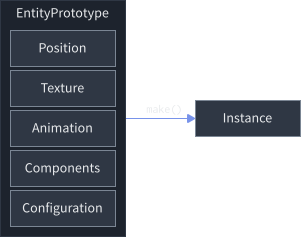
- Builder builds new objects from scratch, Prototype creates new objects by copying their attributes
- in some implementations, the prototype is reactive - if we change the prototype, it will affect all derived entities
- e.g. linked prefabs in Unity

Prefabs in Unity
Transmuter
- modifies a state and behavior of an object
- useful when the change is not trivial
- we can move the modification process from components to separate functions
| 1 | const superBallTransmuter = (entity: GameObject) => { |
| 2 | entity.removeComponent<BallBehavior>(); |
| 3 | entity.addComponent(new SuperBallBehavior()); |
| 4 | entity.state.speed = SUPER_BALL_SPEED; |
| 5 | entity.state.size = SUPER_BALL_SIZE; |
| 6 | return entity; |
| 7 | } |

Factory
- Builder assembles an object, Factory manages the assembling
| 1 | class UnitFactory { |
| 2 | |
| 3 | private pikemanBuilder: Builder; // preconfigured to build pikemans |
| 4 | private musketeerBuilder: Builder; // preconfigured to build musketeers |
| 5 | private archerBuilder: Builder; // preconfigured to build archers |
| 6 | |
| 7 | public spawnPikeman(position: Vector, faction: FactionType): GameObject { |
| 8 | return this.pikeman.position(position).faction(faction).build(); |
| 9 | } |
| 10 | |
| 11 | public spawnMusketeer(position: Vector, faction: FactionType): GameObject { |
| 12 | return this.musketeerBuilder.position(position).faction(faction).build(); |
| 13 | } |
| 14 | |
| 15 | public spawnArcher(position: Vector, faction: FactionType): GameObject { |
| 16 | return this.archerBuilder.position(position).faction(faction).build(); |
| 17 | } |
| 18 | } |

Simulation Patterns
Sandbox
- full simulation takes place within a space close to the player (influence sphere)
- simulation in an area further away is either omitted or simplified
- often used in racing games and open-world games


Replay
- allows to reproduce any state of a game at any time
- all game entities must have a reproducible behavior (similar to multiplayer facility)
- Solution a)
- store all input events from the player and re-play them in the same order
- used in Doom
- the game has to be deterministic, which no longer applies
- Solution b)
- reversible counterpart for each function that modifies the game state
- too complicated, random access will be difficult
- Solution c)
- snapshot the game state every frame (or by keyframes and interpolate)
- used in Braid
Example: Braid
- 40MB for ~60 minutes of replay, uses keyframes for interpolation
- saved 100% state (compressed, removed looping particle emitters)
- audio engine had its own timer with 10% safe margin


Example: Doom Demo File
- Lump file (*.LMP)
- fixed time-loop at a rate of 35 FPS (handled by tick command)
- the file contains only keyboard inputs at each tick
- the game plays the demo, injecting input commands from the demo file
- 13B header + 4B data for each tick ~140B/s

Design patterns: Summary
- use Builder to build new objects
- use Factory to manage construction of new objects
- use Prototype to clone already existing objects
- use Chain to chain up complex actions/processes
- use Selectors to access attributes that are deep in the scene hierarchy
- use Flag to collect a set of features of an object
- use Numeric state for a simple finite state machine
- use Transmuter to change a composition of components upon an object
- use Context to store global game data
Lecture Summary

- I know something about responsibility ownership in component architecture
- I know flyweight pattern
- I know selector pattern
- I know flag pattern
- I know numeric state pattern
- I know builder pattern
- I know prototype pattern
- I know factory pattern
Goodbye Quote
So, I would like to build an airport for you and you don't allow me to tear down some old lady's house.